GoBot device driver for DS18B20, temperature sensor
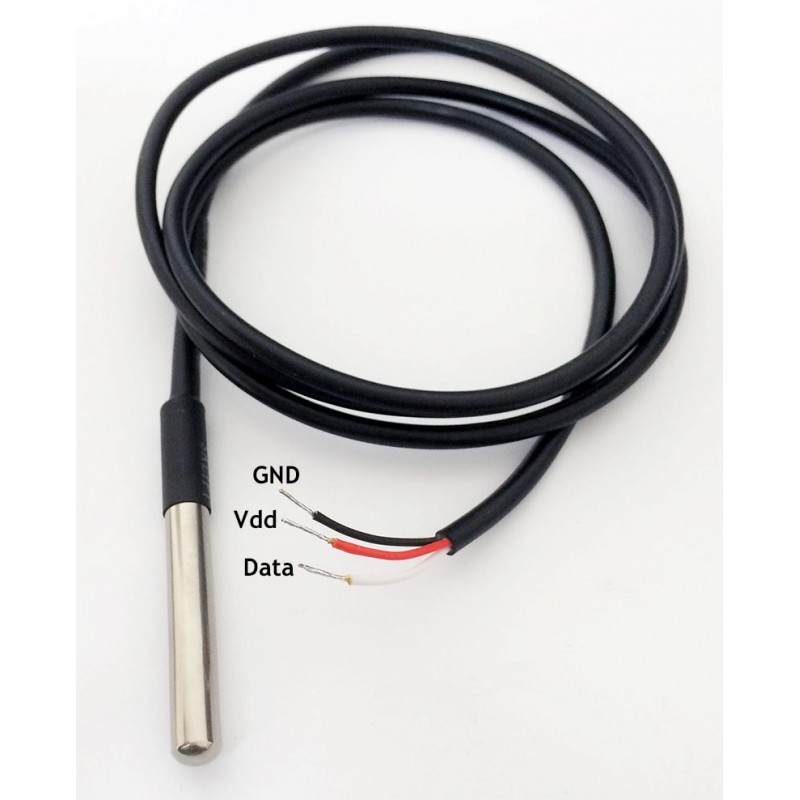
The DS18B20 digital thermometer provides 9-bit to 12-bit Celsius temperature measurements and has an alarm function with nonvolatile user-programmable upper and lower trigger points. The DS18B20 communicates over a 1-Wire bus that by definition requires only one data line (and ground) for communication with a central microprocessor.(RaspberryPi in my case) In addition, the DS18B20 can derive power directly from the data line ("parasite power"), eliminating the need for an external power supply.
Each DS18B20 has a unique 64-bit serial code, which allows multiple DS18B20s to function on the same 1-Wire bus. Thus, it is simple to use one microprocessor to control many DS18B20s distributed over a large area. Applications that can benefit from this feature include HVAC environmental controls, temperature monitoring systems inside buildings, equipment, or machinery, and process monitoring and control systems. [1]
- Measures Temperatures from -55°C to +125°C
- ±0.5°C Accuracy from -10°C to +85°C
- Programmable Resolution from 9 Bits to 12 Bits
Wiring up the DS18B20 to your RPi:
| RPi GPIO(BCM) | Sensor | Remarks |
|---|---|---|
| 5V | Vcc | Pin2 on RPi physical |
| GND | GND | Pin9 on RPi physical |
| 18 | Data | Pin12 on RPi physical |
Please use a 4K7 resistor as a external pull-up between the data and Vcc. Using a higher value of pullup resistor may cause the device to scramble at times with longer wires. The analog signal kind of loses it rectangular shape over larger ‘distances’ coupled with higher pull-up resistors.
Why do I need a new driver ?
Assuming you want to read the temperature at a convenient interval, we could very well use the sysfs to read the device file, issue a couple of modprobe commands and get the temperature. DS18B20 follows the 1-Wire protocol, data over a single pulled-up line. Typically we need a single GPIO port configured for this. In our case GPIO 18 (Pin 12). The program in a loop can query /sys/bus/w1/devices/
When using Gobot the above algorithm can fit into robot.Work,but creates a messy inline anonymous function that would have sysfs calls. Deferred calls to close/cleanup system files are then the responsibility of this same inline function.
Enter Gobot device drivers:
Gobot drivers are about implementing a single interface. This enables your code to be called at right spots by the Adapter.
- Init the driver
- Run work
- Halt / cleanup
All of the above then becomes re-factored into functions that are called as needed by the Adapter Sensors & actuators are devices, and to make one you would have to implement the Driver interface take a look at the driver interface
type Driver interface {
    // Name returns the label for the Driver
    Name() string
    // SetName sets the label for the Driver
    SetName(s string)
    // Start initiates the Driver
    Start() error
    // Halt terminates the Driver
    Halt() error
    // Connection returns the Connection associated with the Driver
    Connection() Connection
}

type Device Driver
This is to say the Adapter shall be accessing these functions on the interface to make it a device. Adapter is looking for no more / less that these functions to make it a run-able device.
Device extension for a Robot & testing
type ThermalProbeDriver struct{
	DeviceID string
	name string
	connection gobot.Connection
}
func (tp *ThermalProbeDriver) findDeviceID()error{
	fail := "findDeviceID: Failed to read device ID"
	files,err := ioutil.ReadDir(sysBusDevices)
	if err!=nil{
		return errors.Wrap(err, fail)
	}
	for _,f :=range files{
		// DS18B20 devices have IDs starting with 28
		matched,_ :=regexp.MatchString(`28-[0-9a-zA-Z]*`,f.Name())
		if matched ==true{
			tp.DeviceID = f.Name() //writes back to the tp prop
			break
		}
	}
	if tp.DeviceID == ""{
		return errors.Wrap(errors.New("DS18B20 device not found"), fail)
	}
	return nil
}
This helps to probe to see if devices like 28* are registered in /sys/bus/w1/devices. Below we extend the driver with ReadTempC
func (tp *ThermalProbeDriver) ReadTempC() (float32, error){
	temp :=float32(0.0) //result
	if tp.DeviceID == ""{
		return temp,DEVERR(DeviceNotFound,tp.name,fmt.Errorf("Device ID not found!- device is not ready"))
	}
	f, err:= os.Open(fmt.Sprintf("%s/%s/w1_slave",sysBusDevices,tp.DeviceID))
	if err!=nil{
		return temp,DEVERR(NoDeviceFile,tp.name,fmt.Errorf("Device ID not found!- device is not ready"))
	}
	defer f.Close()
	r := bufio.NewReader(f)
	for{
		// we are skipping the second return value cause we know there is no question of prefixes
		// none of the lines in this device file are going to be long enough- that incase would need prefixes
		data,_,err := r.ReadLine()
		if err !=nil {
			return temp,DEVERR(DeviceFileReadFail,tp.name,err)
		}
		line:=string(data)
		// We here need to know how to spot the line that says YES m denoting the reading is ready
		matched, err :=regexp.MatchString(`[a-z0-9]\s*\s:\scrc=[0-9a-z]*`,line)
		if matched ==true && line[len(line)-3:] == "YES" {
			// we can read the next line and get the reading
			tdata,_, err := r.ReadLine()
			if err !=nil {
				return temp,DEVERR(DeviceFileReadFail,tp.name,err)
			}
			line = string(tdata)
			pattern := regexp.MustCompile(`t=`)
			index :=pattern.FindIndex(tdata)
			if index ==nil {
				// we havent found the pattern in the string as expected
				return temp,DEVERR(DeviceFileReadFail,tp.name,fmt.Errorf("Failed to find temperature reading in the device file,"))
			}
			reading,err  := strconv.Atoi(line[index[1]:])
			if err !=nil{
				return temp,DEVERR(DeviceFileReadFail,tp.name,err)
			}
			temp=(float32(reading)/1000)
			break
		}
	}
	return temp,nil
}
The above snippet will dwelve into the device file
To conform to the Driver interface, here is the implementation for remaining functions.
func (tp *ThermalProbeDriver) Name() string {
	return tp.name
}
func (tp *ThermalProbeDriver) SetName(s string) {
	tp.name = s
}
func (tp *ThermalProbeDriver) Start()error {
	exec.Command("modprobe","w1-gpio")
	exec.Command("modprobe","w1-therm")
	time.Sleep(time.Second)
	if err:=tp.findDeviceID(); err!=nil{
		return DEVERR(DeviceNotFound,tp.name,err)
	}
	return nil
}
func (tp *ThermalProbeDriver) Halt()error {
	return nil
}
func (tp *ThermalProbeDriver) Connection()gobot.Connection {
	return tp.connection
}
A note for developers:
-
DEVERR is my customized implementation for error. You can either implement your own error or just fmt.Errorf shall do as well.
-
If you are wondering if ThermalProbeDriver can be fitted into the gobot.DeviceList. Here is how you can do it.
import(
"gobot.io/x/gobot/platforms/raspi"
)
r := raspi.NewAdaptor()
ds18bs20:=NewThermalProbeDriver("probe")
robot := gobot.NewRobot("blinkBot",
		[]gobot.Connection{r},
		[]gobot.Device{ds18bs20},
		work,
)
robot.Start()
The adapter will call the Start() and Halt() functions at appropriate times. You need to add the contextual code therein.